
Hardware (Engine OS)

New Features
- On‑device Stem Rendering for RANE SYSTEM ONE - For the first time on DJ hardware, stems can be rendered directly on the device—with no computer required.
- RGB Waveforms on All Engine DJ Devices - Choose between Engine’s classic tri‑band waveforms or full‑color RGB waveforms.
- On‑device Track Star Ratings - Quickly rate tracks directly from the Library or Performance views.
- Redesigned Source Menu - The Quick Source selector and the full‑screen Source Menu are now connected, delivering a more modern, streamlined music source selection experience.
- Pre‑rendered Demo Tracks for Stems - Demo tracks now ship with stems pre‑rendered on the following devices:
- RANE SYSTEM ONE
- Denon DJ PRIME 4+
- Denon DJ PRIME GO+
- Denon DJ SC LIVE 2 / SC LIVE 4
- Numark Mixstream Pro+
- Numark Mixstream Pro Go
- Browse Encoder Turn Behavior Setting - Added a preference to choose whether turning the Browse encoder opens the library or zooms the waveform.
Improvements and Fixes
- Expanded the beat range to 32 beats for Reverb Rise and Reverb Drop effects.
- Redesigned system dialog boxes and enabled interaction using the Browse encoder.
- Main VU meters now correctly display mono output on Denon DJ SC LIVE 2 / SC LIVE 4 and Numark Mixstream series units.
- Album art is now stored in a dedicated folder rather than within the database file. This migration occurs when:
- Importing tracks into Engine DJ
- Packing or exporting to a drive
- Running the Run Cleanup database optimization in Engine DJ Desktop
- Loading tracks from Folder View on an Engine OS device
- Improved Engine Lighting mixing on four‑deck devices with new crossfader‑based lighting mixing and enhanced upfader behavior.
- Fixed an issue where headphone gain did not adjust output volume on Denon DJ PRIME 4 and PRIME 4+.
- Fixed alignment issues between beat grids and waveforms.
- Pressing CUE after track runout now returns the playhead to the existing cue point instead of setting a new one on Denon DJ SC5000M and SC6000M.
- Adjusted Bluetooth device volume label text for clarity.
- Added the ability to load a track into an empty Sample Pad when focus is on Browse or Performance Library views.
- Tightened the Echo Out trigger point to more accurately cut the dry signal between 49%–51%.
- Improved Amazon Music Unlimited track download speeds and switched from concurrent to sequential downloads for better reliability.
- Reduced the time required when switching between music sources.
- Improved Touch FX popup layout.
- Updated Over‑the‑Air (OTA) update popups and update screen UI.
- Refined color‑fading behavior in the Micro Deck UI.
- Added additional padding for track length in Track Info view.
- Fixed an issue where jog wheel displays could get stuck during initialization on Denon DJ PRIME 4+.
- Fixed missing microphone settings on Denon DJ PRIME 4+.
- Fixed an issue where some stems tracks did not display the stems icon when packed to an external drive.
- Fixed an issue where Auto Loop Pad Mode would default to Bank 2 on Numark Mixstream series units.
- Fixed missing icons for Engine Remote Library tracks in the Engine Lighting UI.
- Improved dialog wording when connecting drives containing Rekordbox libraries.
- Fixed an issue where selecting a new source did not always return to the Library view.
- Fixed intermittent Browse encoder scrolling issues.
- Fixed Engine Lighting dropouts or stuttering when loading tracks.
- Fixed waveform overview issues for unanalyzed streaming tracks.
- Fixed incomplete streaming track downloads on slow internet connections.
- Fixed an issue where SoundCloud GO+ tracks were not added to History.
- Fixed a Beat Grid Editor visibility issue in Day Mode.
- Fixed deck indicator number alignment in horizontal player views.
- Fixed an issue where the playhead position did not update after jumping to CUE on motorized platter devices.
- Fixed an issue where streaming tracks were not added to Prepare when using hardware controls.
- Fixed a crash that could occur when importing Rekordbox libraries.
- Fixed inconsistent screen brightness behavior across some devices.
- Fixed an issue where certain Bluetooth keyboards were not shown in the device list.
- Fixed an issue with the Engine Lighting shortcut accessed via the settings cog.
- Fixed missing album art in the History list.
- Fixed an issue where track titles could fade out in Performance View.
- Improved playlist loading times over networked players.
- Fixed Bluetooth audio stuttering in certain environments when playing pre‑rendered stems tracks.
- Fixed layout issues where the power‑loss pop-up text did not fit on the screen.
- Fixed rare playback audio glitches.
- Fixed an issue where some devices would not reboot directly into the update screen.
Software (Engine Desktop)
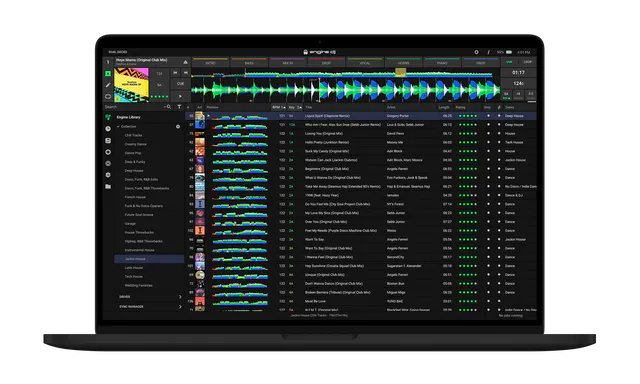
New Features
- RGB Waveforms - Choose between Engine’s classic tri‑band waveforms or full‑color RGB waveforms.
- Import Assistant - Quickly and easily import your music library from Serato, Apple Music / iTunes, rekordbox, or Traktor using a guided, step‑by‑step workflow.
Improvements and Fixes
- Fixed an issue where drag‑and‑drop actions were not permitted.
- Fixed an issue where some tracks were missing the Stems column icon.
- Fixed an issue where the Stems processor could fail to download in certain scenarios.
- Fixed an issue where the Stems list file size was reported incorrectly in some cases.
- Fixed an issue where keyboard shortcuts were missing from tooltip dialogs.
- Fixed an issue where album artwork was not displayed in History lists.
- Fixed a crash that could occur when using Auto‑Relocate.
- Fixed an issue where Engine DJ could fail to install after a fresh Windows 11 installation.
- Fixed an issue where closing Engine DJ during stem rendering could cause rendering to fail.
- Fixed an issue where the Unsupported Sample Rate dialog prevented the Stems Support Download dialog from appearing.
- Fixed an issue where the Maintain Play State option (Engine OS only) was visible in Desktop settings.
- Fixed an issue on macOS where certain drives could not be safely ejected.
Was this article helpful?
That’s Great!
Thank you for your feedback
Sorry! We couldn't be helpful
Thank you for your feedback
Feedback sent
We appreciate your effort and will try to fix the article