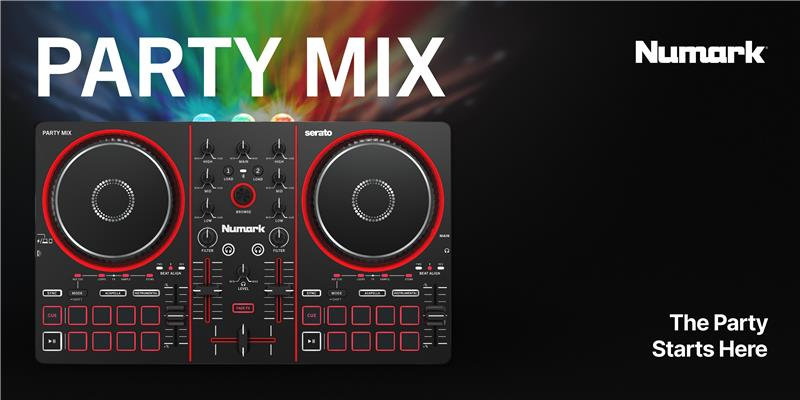
The Numark Party Mix is a compact DJ controller designed for aspiring DJs, featuring a built-in light show and compatibility with popular DJ software. It enhances DJ workflows with expanded performance pads, Stems controls, and Bluetooth MIDI support for wireless use. Below, we've detailed answers to some of the most frequently asked questions regarding the Party Mix.
TABLE OF CONTENTS
What DJ software is included with the Party Mix, and what platforms are compatible?
What djay features are unlocked when I connect my Party Mix, and which features require a subscription?
Why don’t I hear audio from my headphones or speaker when using Bluetooth MIDI?
Why doesn't my Party Mix connect to my DJ app when I pair it through my device settings?
Why is the Bluetooth LED flashing and audio popping coming from the Main outputs when I power the Party Mix from my mobile device?
Why doesn't my device automatically reconnect to djay over Bluetooth after turning Bluetooth off and back on?
What are the Party Mix's audio specs and driver requirements?
Official Overview Video and Setup Guide
What’s included in the box?
- Party Mix
- USB-C Cable
- Software Download Card
- Smartphone/Tablet Stand
- 1/8” to Stereo RCA adapter
- Quickstart Guide
- Safety & Warranty Manual
What DJ software is included with the Party Mix, and what platforms are compatible?
The Party Mix is plug-and-play compatible with Algoriddim djay Pro and Serato DJ Lite, both included with your purchase.
The Party Mix will also work with Serato DJ Pro and VirtualDJ, which require a separate paid license.
Free Software | Mac/Win
| iOS
| Android
|
|---|---|---|---|
Serato DJ Lite | ✅ | ⛔ | ⛔ |
Algoriddim djay PRO | ✅ | ✅ | ✅ |
Paid Software | |||
Serato DJ Pro | ✅ | ⛔ | ⛔ |
Virtual DJ Pro | ✅ | ⛔ | ⛔ |
What djay features are unlocked when I connect my Party Mix, and which features require a subscription?
As a general rule, any feature with a dedicated hardware control on the device is unlocked and ready to use at no additional cost.
Additional djay features that are not mapped to hardware controls may require a paid subscription.
Pro features that are unlocked with hardware:
- Neural Mix™ – isolate vocals, drums, and instrumentals in real time
- Pre-cueing with headphones
- Instant FX - dedicated pad mode with dynamic instant FX
- Sampler – add beats, textures, and live remix elements
- Crossfader FX – perform expressive, dynamic transitions
Pro features that require a subscription:
- Automix – AI-powered automatic DJ mixes
- Looper – add beats, textures, and live remix elements
- Video Mixing – mix music videos, add overlays, and output visuals to an external screen
- Recording – capture your mixes in high-quality audio
- Content Packs – 50+ audio effects, 1000+ loops, samples, visuals
- 4-Deck Mode – layer multiple tracks and stems
- Advanced MIDI Learn to customize mappings
- Full media library editing – edit track information and manage your collection with flexible tools
- Custom playlists and preparation tools – create and organize playlists to prepare for any performance
- USB library export - export your playlists and tracks from djay directly to a USB or SD drive for use on other devices or DJ systems
- Library Batch Analysis - background analysis of your tracks
Does the Party Mix support Stems control?
The Party Mix features a Stems pad mode as well as Acapella and Instrumental buttons to isolate vocals and instrumentals on the fly.
What pad modes are available on the Party Mix?
Available pad modes include:
- Hot Cue
- Loops
- FX
- Sampler
- Stems
Can I use the Party Mix with my smartphone or tablet?
Yes! This is one of the highlights of the Party Mix! You can connect the Party Mix to your smartphone or tablet using either the included USB-C cable or via a Bluetooth connection.
Note: For improved battery life on mobile devices, use wireless charging if available for your device, or connect to a powered USB hub that can provide both power to Party Mix and connection with your device.
Is the Party Mix bus powered?
The Party Mix is bus powered but can also be powered via a USB power adapter for when using Bluetooth connection. Power adapters must have a minimum 5V, 500mA power rating to use Bluetooth with Party Mix.
Why don’t I hear audio from my headphones or speaker when using Bluetooth MIDI?
When using Bluetooth MIDI, the Party Mix audio outputs are disabled. You will need to monitor playback using the built-in speaker on your phone or tablet, or you can connect your speakers or headphones directly to your mobile device.*
*A separate adapter may be needed if your smartphone or tablet does not feature a headphone jack.
Where do I connect speakers and headphones?
- Speakers connect to the main output using the included 1/8" to RCA adapter
- Headphones connect directly to the 1/8" (3.5 mm) headphone output. The headphone volume is controlled using the Cue Gain knob.
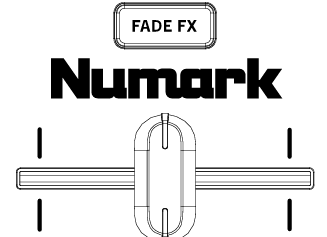
What are Fade FX?
When enabled, the Fade FX button enabled the Fade FX feature in your DJ software. This automatically applies a particular effect when moving the crossfader away from your active deck.
Why doesn't my Party Mix connect to my DJ app when I pair it through my device settings?
Pairing your Party Mix through your computer, phone, or tablet’s standard Bluetooth settings will not connect it to your DJ app.
To use your Party Mix with your DJ software, you’ll need to connect it as a Bluetooth MIDI device in the DJ app.
For best results:
- Open your DJ app.
- Navigate to the Bluetooth MIDI settings.
- Select your Party Mix from the list to establish the connection.
This method ensures proper communication between your Party Mix and the software.
Why is the Bluetooth LED flashing and audio popping coming from the Main outputs when I power the Party Mix from my mobile device?
If the Bluetooth LED on your device is flashing continuously, and you're hearing popping sounds from the Main outputs, it's likely that your mobile device isn't supplying enough power to the Party Mix.
To resolve this issue:
- Connect the Party Mix to a USB power adapter using the USB-C power port (indicated by the lightning bolt icon.
- Then, connect your mobile device to the Party Mix using the USB-C device port (indicated by a computer icon).
Providing external power ensures stable performance and prevents audio issues.
Why doesn't my device automatically reconnect to djay over Bluetooth after turning Bluetooth off and back on?
After Bluetooth is turned off and then re-enabled on your phone, tablet, or computer, your device will not automatically reconnect to djay via Bluetooth. To re-establish the connection, you’ll need to manually select your MIDI device again within the djay app.
What are the dimensions and weight of the Party Mix?
- Dimensions (L x W x H)
- 13.34” x 8.08” x 1.84”
- 339 x 205 x 47 mm
- Weight
- 2.43 lbs. / 1.1 kg
What are the Party Mix's audio specs and driver requirements?
- Audio: 24-bit / 48 kHz resolution
- Driver: None / Class-compliant
Was this article helpful?
That’s Great!
Thank you for your feedback
Sorry! We couldn't be helpful
Thank you for your feedback
Feedback sent
We appreciate your effort and will try to fix the article